Why Does My Ceiling Fan Wobble Only on High Speed? (Real Fix)
Here’s something most people don’t expect: a small amount of movement at top speed is completely normal for nearly every ceiling fan ever made, even brand-new ones. So if you’re wondering why does my ceiling fan wobble only on high speed while running perfectly smooth on low and medium, you’re not necessarily looking at a broken fan — you’re looking at basic physics combined with a handful of very fixable mechanical details. A wobbly ceiling fan is one of the most common household complaints there is, and thankfully also one of the easiest to actually resolve. This guide walks through exactly which parts to check, in the order that actually matters, so you’re not guessing your way through it.
Start With the Screws, Not the Blades
Before assuming anything is bent or unbalanced, grab a screwdriver and check every visible screw on the fan: the blade brackets, the blade irons, and the fan mounting bracket against the ceiling. Loose screws causing ceiling fan to wobble on high speed is one of the most common explanations, and it’s also the fastest to rule out — vibration from months or years of use naturally works screws loose over time, especially at the blade attachment points. Tighten everything snug, but don’t overtighten past what the manufacturer’s holes are designed for. This single step alone resolves a large share of ceiling fan wobbling complaints before any tools beyond a screwdriver are even needed.
Check the Hanger Ball and Mounting Bracket
Nearly every ceiling fan hangs from a “hanger ball” that sits inside a groove in the mounting bracket at the ceiling, allowing a small amount of intentional pivot. A ceiling fan loose mounting bracket, or a hanger ball that isn’t fully seated in that groove, lets the entire fan body sway slightly rather than staying rigid — and that sway becomes far more obvious the faster the blades spin. If your ceiling fan hanger ball not seated properly is the issue, you’ll often notice the wobble seems to come from up near the ceiling rather than from the blades themselves.
Why Physics Makes This Worse at High Speed Only
This is the part that trips people up: why does my ceiling fan only wobble on the highest setting when everything looks fine sitting still? A tiny imbalance — even a gram or two of uneven weight between blades — barely registers at low speed, where rotational force is minimal. Ceiling fan smooth on low but shakes on high is exactly what you’d expect from that same small imbalance, because centrifugal force increases sharply as speed increases, amplifying a flaw that was always technically there but never large enough to notice until now. In other words, a ceiling fan wobble one speed only pattern isn’t a separate mystery problem — it’s the same underlying cause simply becoming visible at the point where physics finally makes it obvious.
Balancing the Blades
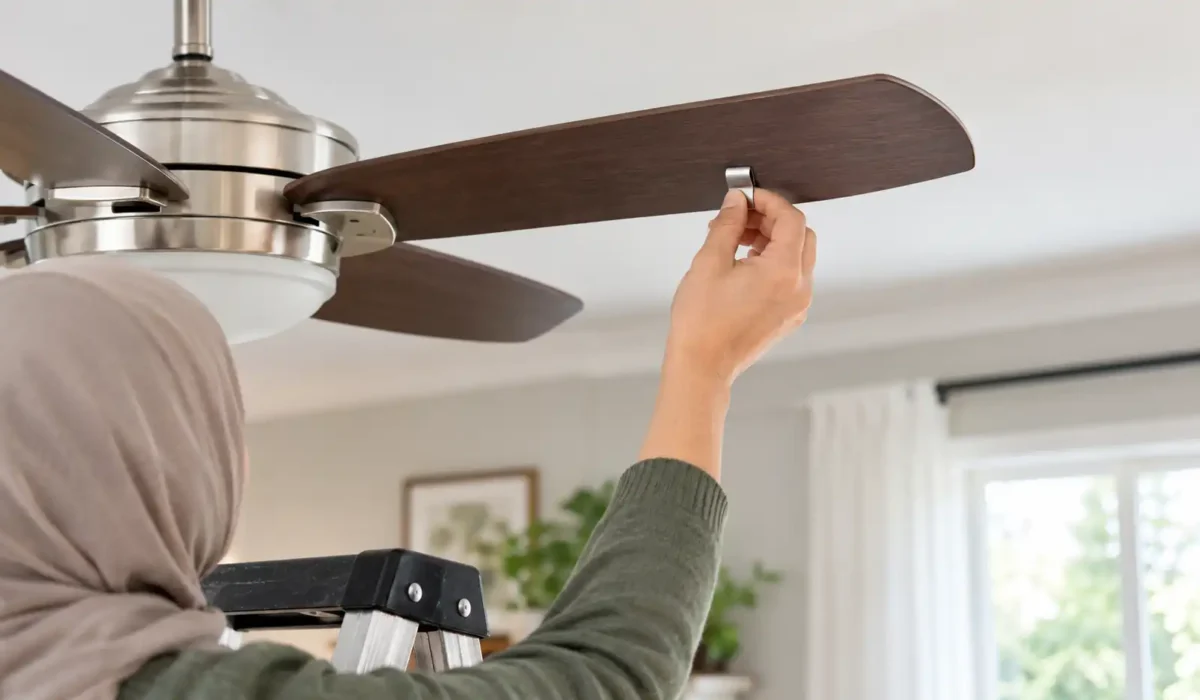
Once screws are tight and the mounting is solid, ceiling fan unbalanced blades is the next most likely cause, and it’s directly fixable with an inexpensive fan balancing kit that most hardware stores carry for just a few dollars. Learning how to balance ceiling fan blades with weights is simpler than it sounds: the kit typically includes a spring clip and a set of small adhesive weights. Clip it partway along one blade, test the fan, and move it inward or outward until the wobble reduces, then repeat on the correct blade before attaching the weight permanently. Ceiling fan wobbles but blades look fine perfectly describes why this step exists — the imbalance is rarely visible to the eye, which is exactly why the trial-and-error clip method works better than guessing.
That Clicking Sound Isn’t Separate From the Wobble
If a rhythmic clicking or tapping shows up alongside the shaking, don’t treat it as a second, unrelated problem. Ceiling fan clicking noise high speed is almost always the wobble itself, manifesting as metal-on-metal contact somewhere in the fixture — often a blade iron tapping the motor housing, or a light kit component vibrating against the canopy. Fixing the underlying wobble through tightening and balancing typically resolves the clicking at the same time, without needing a separate repair.
When the Downrod Itself Is the Problem
On fans installed with a downrod rather than mounted flush to the ceiling, ceiling fan downrod swaying can be the real source of movement, separate from the blades entirely. A downrod that isn’t fully seated into the motor housing, or one that’s slightly bent from shipping or installation, will visibly sway at higher speeds even with perfectly balanced blades. This produces a distinct kind of ceiling fan high speed noise and motion that starts higher up on the fixture rather than at the blade tips, which is a useful clue when you’re trying to narrow down where the movement is actually coming from.
Usually Normal
- A very slight, barely visible movement only at the highest speed
- No unusual noise beyond normal fan operation
- Movement that’s identical to how the fan behaved when new
Worth Investigating
- Visible shaking you can see from across the room
- New clicking, tapping, or grinding sounds
- Wobble that’s gotten noticeably worse over recent months
Is it safe to run a wobbling ceiling fan on high speed while you troubleshoot? A slight wobble is fine short-term, but stop using high speed if the shaking is severe, if the fan feels loose at the ceiling, or if you notice the mounting bracket itself moving. Anything involving the electrical wiring, the ceiling junction box rating, or a fan that feels unstable at its mount is worth having a licensed electrician look at rather than continuing to run it.
I noticed this pattern myself after helping set up a handful of fans in my own home over the years, in different rooms, from different brands. Every single one had at least a whisper of movement at the top setting straight out of the box, before anything had loosened or aged at all. It reframed how I thought about “wobble” entirely — I’d always assumed any movement meant a defect, when really the more useful question was never “does it wobble,” but “has that wobble changed, and by how much.”
That shift in thinking is honestly the most useful takeaway from all of this: chasing a perfectly still fan at full speed is chasing something that was probably never realistic in the first place.
Frequently Asked Questions
Is it normal for a ceiling fan to wobble a little on high speed?
Yes, a small, barely noticeable amount of movement at top speed is normal for the vast majority of ceiling fans, including new ones. What’s worth investigating is a wobble that’s severe, that’s accompanied by new noise, or that has clearly gotten worse over time.
How do I know if my ceiling fan needs a balancing kit?
If you’ve already tightened every visible screw and confirmed the mounting bracket and hanger ball are secure, but the fan still shakes noticeably at high speed, a balancing kit is the next reasonable step. These kits are inexpensive and use a simple clip-and-test method to find where the imbalance is coming from.
Can a loose mounting bracket cause a ceiling fan to wobble?
Yes, and it’s one of the more overlooked causes. If the bracket itself isn’t fully tightened to the ceiling, or the fan’s hanger ball isn’t properly seated in its groove, the entire fixture can sway at higher speeds even if the blades themselves are perfectly balanced.
How tight should ceiling fan blade screws be?
Snug and firm, but not forced past resistance. Blade screws should hold the blade completely still with no play when you gently try to move it by hand, without over-torquing the screw to the point of stripping the mounting hole, which can create a different problem entirely.
When should I stop using a wobbling ceiling fan and call an electrician?
Stop running it on high speed and call a licensed electrician if the wobble is severe enough to see clearly from across the room, if the mounting bracket itself feels loose at the ceiling, or if you notice any burning smell, sparking, or exposed wiring. Those signs go beyond normal mechanical wobble and into territory that needs a professional.
Working through the screws, the mounting bracket, blade balance, and the downrod in that order resolves why does my ceiling fan wobble only on high speed for most households — usually with nothing more than a screwdriver and a five-dollar balancing kit. A fan that ceiling fan wobbles on high speed today doesn’t have to stay that way by next week, and most people are surprised how quickly the fix actually takes once they know where to look first.
Get a personalized checklist for your electrical fixtures and more — generated in under two minutes.
See recurring home tasks organized by month, so nothing gets forgotten.
Has your ceiling fan always wobbled a little on high, or is this something that only started recently?
Not sure what your home needs?
Build a free, personalized maintenance plan in under 2 minutes.
Build My Home PlanRelated Articles
 Electrical & Safety
Why Does My House Smell Like Fish When There’s No Fish? 7 Causes (One Is a Fire Warning)
A fishy smell with no fish in sight? Here are the 7 real causes — including one fire…
 Electrical & Safety
Why Does My Smoke Detector Beep Randomly? 7 Real Causes & Fixes
A random beep is rarely random. Here are the 7 most common causes of a chirping smoke detector…
 Electrical & Safety
Why Do My Lights Dim When the Furnace Turns On? (Normal vs. Warning Sign)
Does it happen for about a second, right when the furnace starts, and then everything goes back to…